Android · Twitch · free and open source
Stream from your phone. Stay live in dead zones.
Fullbars is a free Android app for streaming IRL on Twitch. It can send your stream over mobile data, a Wi‑Fi hotspot and spare phones at once, through a small server you own. When every connection drops, viewers see a card instead of a frozen stream.
Version 0.6.0 · Android 12 or newer · a test build from GitHub, not on Google Play yet.
Several connections in. One steady stream out.
With Combine connections on, your phone splits the stream across every connection it has. Your BRB server puts it back together and sends one stream to Twitch. Try a dead zone:
A simulation with made-up figures, in Mb/s. The real live screen shows each connection like this along the bottom.
Weak spots hurt less
Two or three connections carry the stream at once, and Fullbars lowers the quality before things stall, not after.
Dropouts don't end your stream
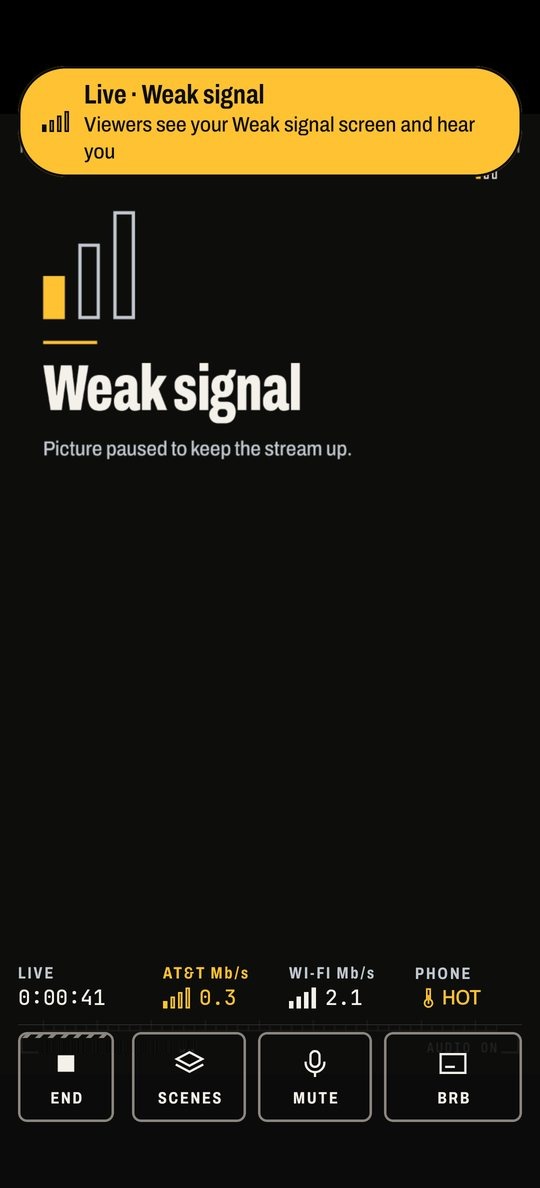
In a tunnel or a dead zone, the server keeps the Twitch stream going with a Signal lost card your phone made, for up to 10 minutes. When you're back, the picture returns within seconds.
Nothing runs at home
No PC and no home internet. The server is yours, so no streaming service sits in the middle, and it never writes your stream key to its logs.
Three ways to get a phone on Twitch.
| Question | Straight to Twitch | A hosted bonding service | Fullbars with your BRB server |
|---|---|---|---|
| Connections | One at a time | Several | Several: mobile data, Wi‑Fi, helper phones |
| When everything drops | A frozen frame, then offline. Twitch's Disconnect Protection can show its own fixed message for up to 90 seconds | Depends on the service | Your Signal lost card, for up to 10 minutes. Twitch sees one unbroken stream |
| Kick and YouTube too | Twitch only | Depends on the service | Your server also sends it to Kick, YouTube or any RTMP server. Your phone uploads once |
| What it costs | Nothing | A monthly fee | The app is free. The server is about $4–10 a month, or Oracle Cloud's free tier |
| Who sits in the middle | Nobody | The service | Only your own server |
| Where your stream key lives | On your phone | With the service | On your phone and your server, never in its logs |
You can start straight to Twitch and add the server later. Fullbars works without one; you just don't get Combine connections, helper phones, the Signal lost card or Also stream to.
What's in the app
Test streams
Test is the default. It uses Twitch's bandwidth test, so nobody can watch a test on Twitch, not even you. A pre-flight check before you start, and a recap after: "We kept you live through 3 connection drops."
Helper phones
A spare phone in your pocket adds its mobile data. While you're live it joins your streaming phone's hotspot by itself, so there's nothing to type.
Helpers speak Moblin's Moblink protocol, so Moblin's helpers should work too. So far it's tested with Fullbars on both phones.
DJI Pocket 3 Labs
Fullbars starts the Pocket's stream over Bluetooth and takes it in over Wi‑Fi, so the Pocket works as a wireless camera on Android.
Unofficial: DJI doesn't support it, and it sits behind a Labs switch. Other RTMP cameras work too.
Scene cards
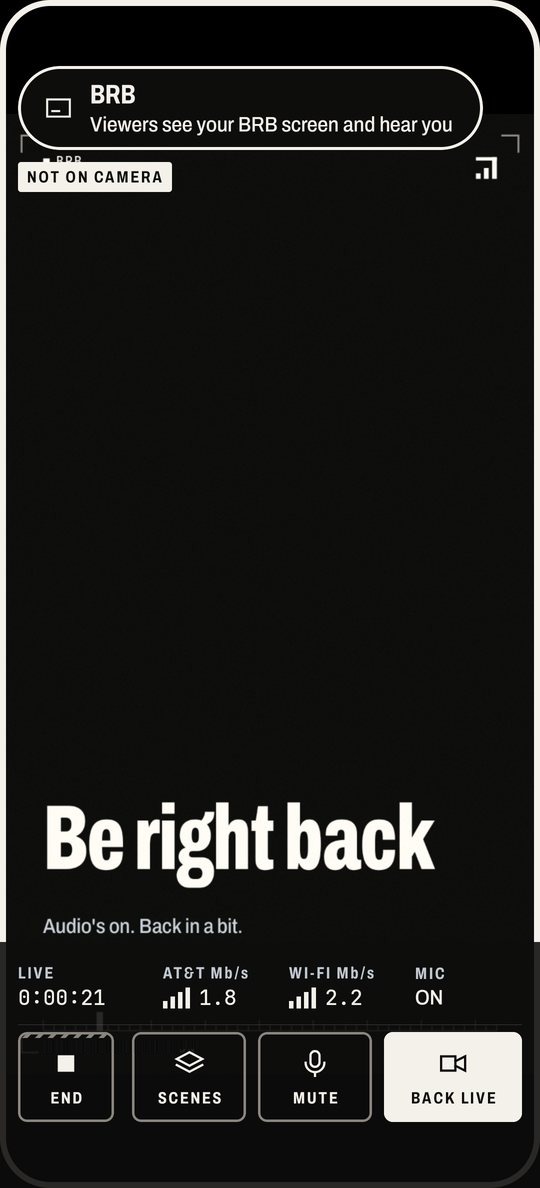
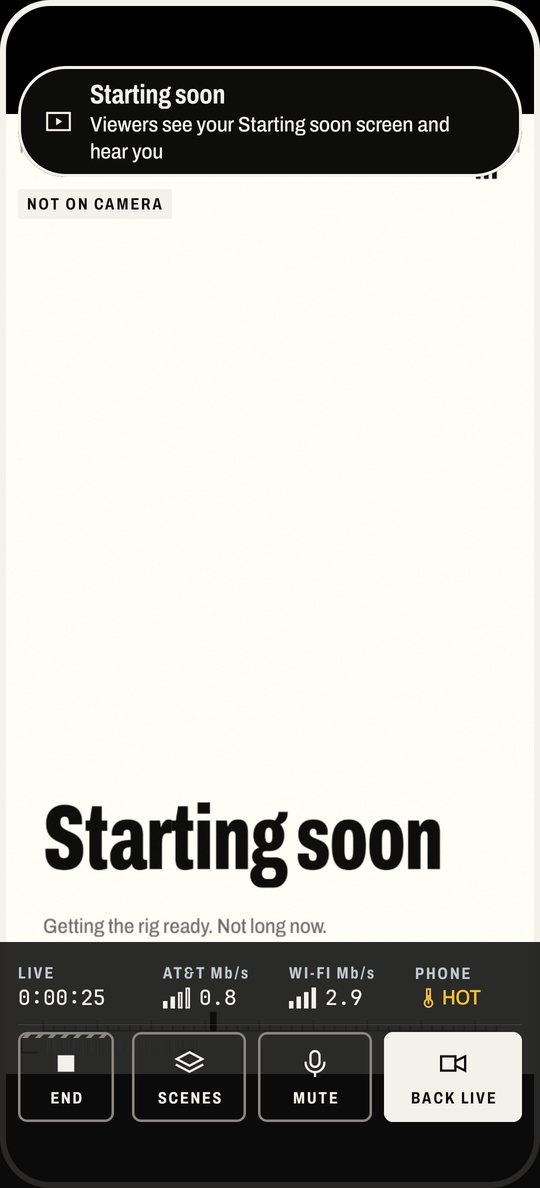
Starting soon, BRB, Privacy and Ending, one tap away, plus automatic Signal lost, Weak signal and Camera lost cards. Your phone draws them, so they look the same with or without the server.
Make each one yours: your words, a picture, a still or GIF background, a layout and an accent colour. Add a countdown, a time-away counter, chat on the card, or a web page instead of the card.
Alerts
Follows, subs, gift subs, bits, raids and tips, drawn on stream with sound. Give each kind your own words and picture, and try one before you go live.
Chat and overlays
Twitch chat with emotes, on your screen and on stream. Chat read aloud into your earbuds. Text, image, or StreamElements and Streamlabs web overlays.
Also stream to
Your BRB server can send the same stream to Kick, YouTube or any RTMP server too, up to three at once. Your phone still uploads it only once.
Chat, alerts and mod commands stay on Twitch. Test streams never go anywhere else.
Your mods
Mod chat commands, and a web remote your mods can open to switch scenes for you.
My OBS
Streaming through OBS at home? The server can feed your OBS instead of Twitch, and NOALBS can switch scenes from its stats.
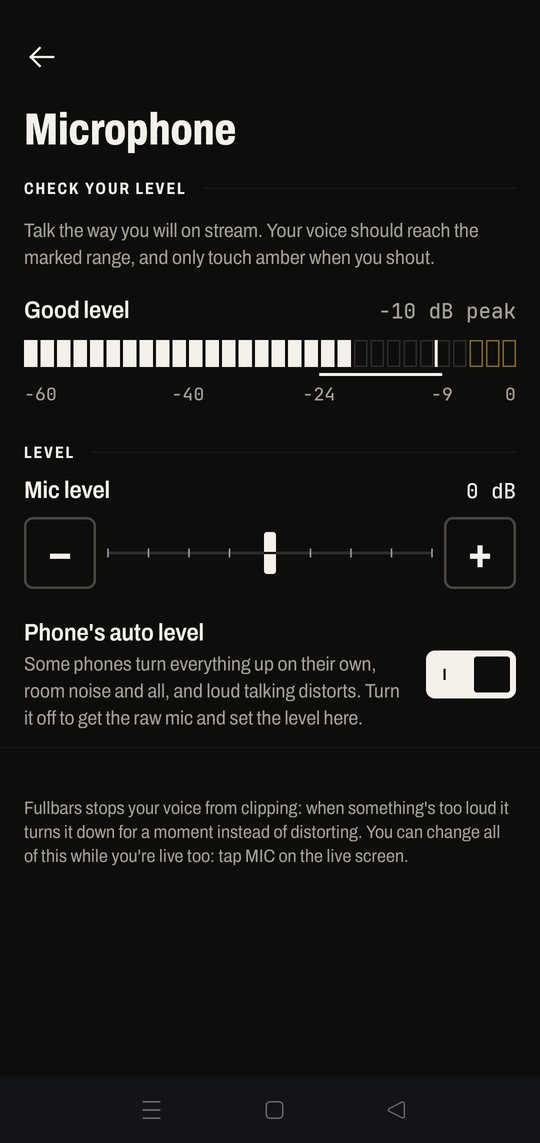
Your mic, your level.
Some phones turn everything up on their own, room noise and all, and loud talking distorts. On a OnePlus 12, the phone's own processing runs about 28 dB hotter than the raw mic, which is why streamers on it sound blown out.
A live level meter
Talk the way you will on stream and watch where your voice lands.
Phone's auto level
Turn it off to get the raw mic and set the level yourself.
A limiter
When something's too loud, Fullbars turns it down for a moment instead of distorting.
Landscape setup
Stream sideways and the whole app sets up sideways too, even with rotation lock on: the checklist on the left, the go-live button under your right thumb.
The Instrument design
One dark plate over the video. Quiet while things are fine, loud only when something's wrong.
Also new
Scene cards you can make your own, your own words and picture on alerts, Twitch emotes in chat, and Also stream to for Kick and YouTube.
Set the mic in Settings › Microphone before you go live, or tap MIC on the live screen.
Live in 90 seconds. The BRB server takes an evening.
Steps 1 to 3 get you streaming straight to Twitch. Steps 4 to 6 are optional: they keep you live when the signal goes, and add Kick and YouTube.
| Step | What | Time | Cost |
|---|---|---|---|
| 1 | Install the app | 2 min | Free |
| 2 | Sign in with Twitch | 1 min | Free |
| 3 | Do a Test stream | 5 min | Your data |
| 4 | Set up your BRB serverOptional. Rent a small server and pair it by QR code. | 30–60 min, once | $4–10 a month |
| 5 | Add helper phones and a hotspotOptional. Needs step 4. | 10 min | Their data plans |
| 6 | Also stream to Kick or YouTubeOptional. Needs step 4. | 5 min | Free |
FAQ
Is it really free?
Yes. The app is free and open source (GPL-3.0). The only thing you might pay for is your BRB server, which you rent yourself from any provider, usually $4–10 a month. Oracle Cloud's free tier works too. Fullbars doesn't take a cut or see your stream.
Which phones does it work on?
Android 12 or newer. So far it's been tested on a OnePlus 12 (Android 16) as the streaming phone, with a Pixel 5 (Android 14) as a helper. Other phones should work, but they haven't been tested yet. If yours misbehaves, please open an issue on GitHub.
Is there an iPhone version?
No, Fullbars is Android only.
Do I need the BRB server?
No. Without one, Fullbars streams straight to Twitch over one connection, and scenes, chat, alerts and overlays all still work. The server is what lets you combine connections, use helper phones, and stay on air when everything drops.
What do viewers see when I lose signal?
With the BRB server, a Signal lost card ("The stream picks up when the connection's back") made by your phone to match your stream. Twitch sees one unbroken stream, and your picture comes back within seconds of your signal. If you're gone for 10 minutes, the server ends the stream.
Without the server, viewers see a frozen frame, and Twitch may show you as offline until your phone reconnects. If Disconnect Protection is on in your Twitch settings, Twitch can show its own fixed message for up to 90 seconds instead; we haven't tested that with Fullbars yet.
How much data does it use?
At 1080p and 6 Mb/s, about 2.8 GB an hour, split across your connections. Home shows the figure for the quality you pick before you go live. Fullbars lowers the quality on its own when the signal gets weak.
Is my stream key safe?
Sign in with Twitch and Fullbars fetches your key; you never copy it anywhere. With a BRB server, the phone sends it over an encrypted connection that trusts only your server's key, from the pairing QR code. The server keeps it in a file only it can read and never prints or logs it. Kick or YouTube keys you add for Also stream to are kept the same way. The stream itself is encrypted between your phone and your server.
Does the DJI Pocket 3 work?
Yes, as a Labs feature. Turn on Labs on the Camera page, and Fullbars finds the Pocket over Bluetooth, starts its stream and takes it in over Wi‑Fi. It's unofficial: DJI doesn't support it, and a future Pocket firmware could break it. Any camera that can stream RTMP works too.
Can I stream to YouTube or Kick?
Yes, with your BRB server. Settings › Also stream to sends the same stream to Kick, YouTube or any RTMP server, up to three at once, next to Twitch. Your phone uploads it once; the server sends the copies. Chat, alerts and mod commands stay on Twitch, and Test streams never go anywhere else.
Without the server, Fullbars streams to Twitch only.
Does the app collect anything?
No. There's no account with us, and no analytics or crash reporting. The app talks only to Twitch, to StreamElements or Streamlabs if you add them, to web pages you add as overlays or cards, and to your own BRB server.
Is it on Google Play?
Not yet. Test builds are on GitHub. They're debug-signed, so when a release-signed build arrives you'll need to uninstall the test build first.
Licences
All the source is on GitHub.
- The Fullbars app
- GPL-3.0-or-later
- The BRB server
- Apache-2.0
- srtla-kt, the bonding
- Apache-2.0
- srtla_rec, inside the BRB server
- AGPL-3.0, BELABOX's SRTLA receiver, built unmodified
- Archivo and JetBrains Mono, the type
- SIL Open Font License 1.1 (Archivo, JetBrains Mono)